
Energy ratings, without the friction.
BERS Pro 6 is the NatHERS accredited home energy rating tool built for Australian assessors. Draw the home in 2D, check it in 3D, run the AccuRate (Chenath) engine and generate certificates for the HERS Portal — all in one Windows application.
Version 6.0.0 · Engine 3.24 · Free to download, sign in with your Energy Inspection account.
Building or renovating? Ratings are done by accredited assessors. Find an Assessor to rate your home
AccuRate (Chenath) engine 3.24
The same CSIRO engine behind AccuRate
NCC 2025 ready
Load limits, classes 1A, 1B, 2 and 4
Whole of Home
Appliances, hot water, PV and battery
Trusted for 10+ years
Used by assessors across Australia
Always up to date
Updates delivered automatically
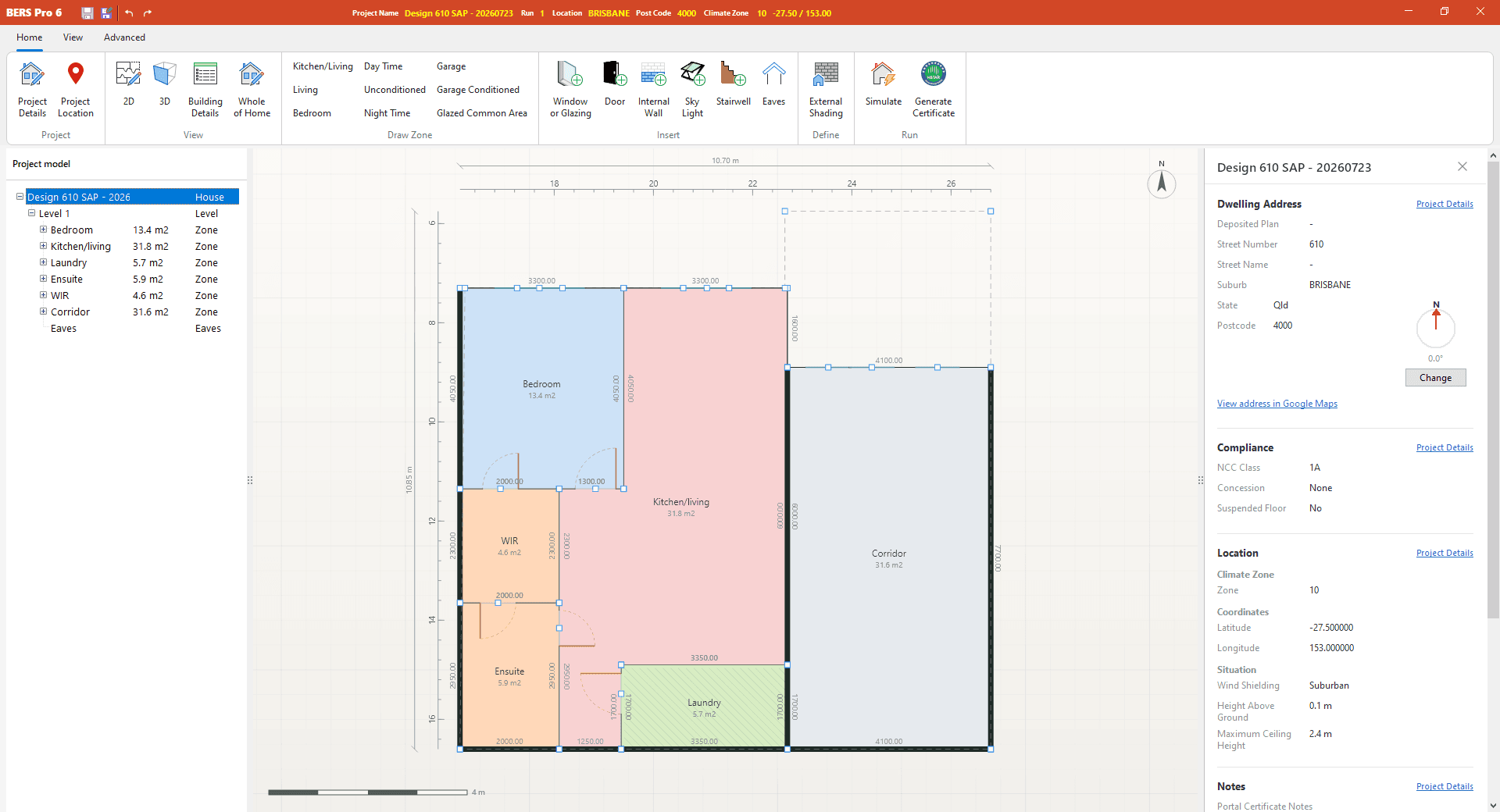
Model in 2D
Draw the home the way you read the plans
A fast, precise plan editor built around how assessors actually work: trace, zone, insert openings and move on.
Trace zones over the real plan
Load the architect's PDF or image, calibrate the scale and draw zones directly on top. Snap, nudge, mirror and dimension as you go.
Every zone type, every level
Living, kitchen/living, bedroom, day and night time, unconditioned, garage and glazed common areas across multi-level homes with level overlays.
Openings from the WERS library
Insert glazing, doors, skylights and stairwells, pick certified products from the WERS database and replace glazing across the model in one action.
Defaults, undo and validation
Project defaults fill in constructions for you, full undo/redo keeps mistakes cheap, and zone reference checks catch problems before you simulate.
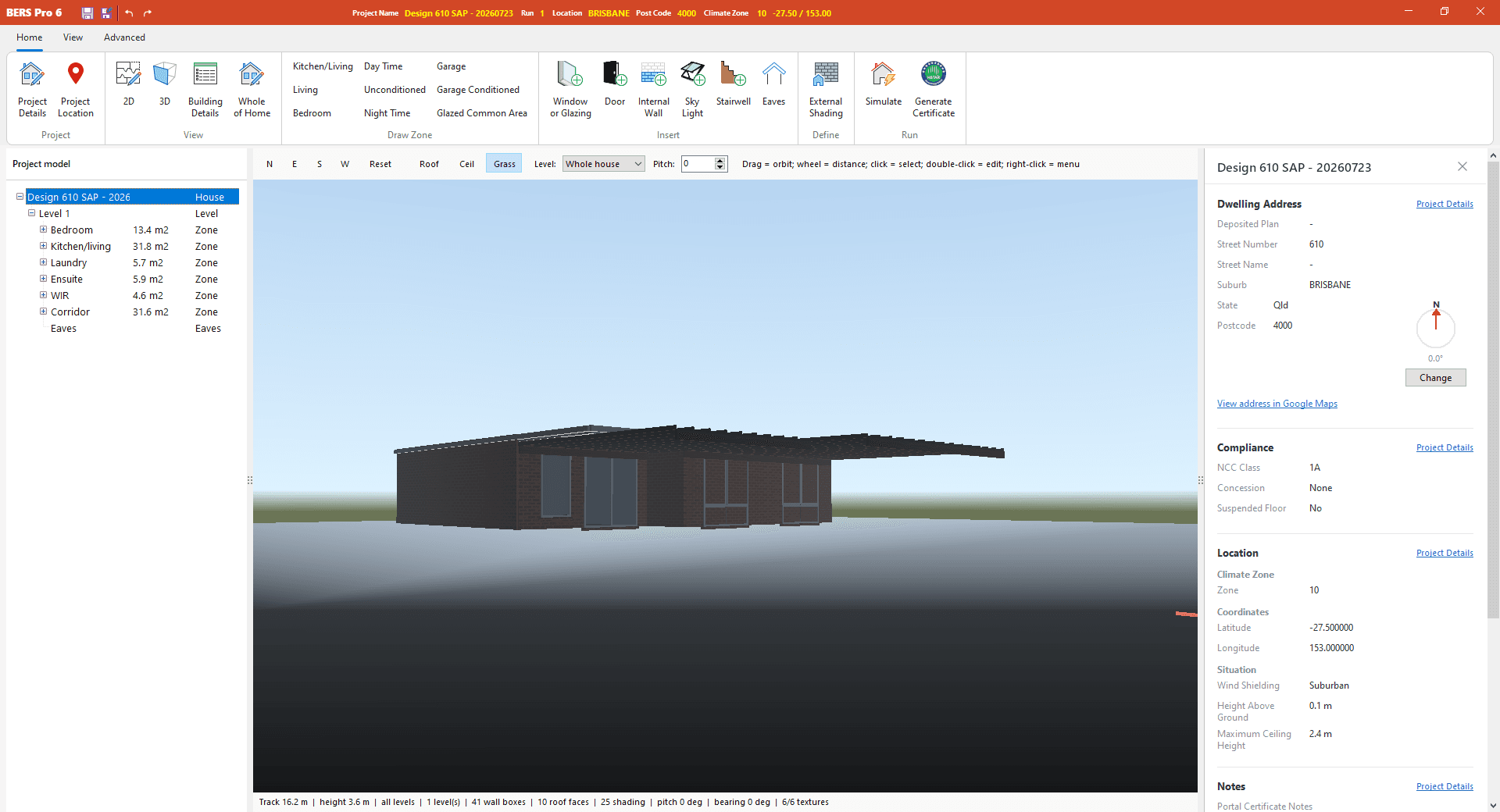
Check in 3D
See what the engine sees
Every 2D edit is reflected in a live 3D model, so shading, roofs and orientation are verified before you simulate.
Sun, shade and orientation
Set true north, see the sun path and check how eaves, pergolas, wing walls and neighbouring obstructions shade every opening.
Roofs, eaves and levels in context
Orbit the model to confirm roof pitch, eave projections, stair voids and inter-level floors match the drawings.
Fabric you can trust
External, upper and internal walls, ceilings, roofs, floors and floor coverings drawn from the reference catalogue, with R-value and air-gap calculators built in.
Simulate & analyse
Results you can explain to a client
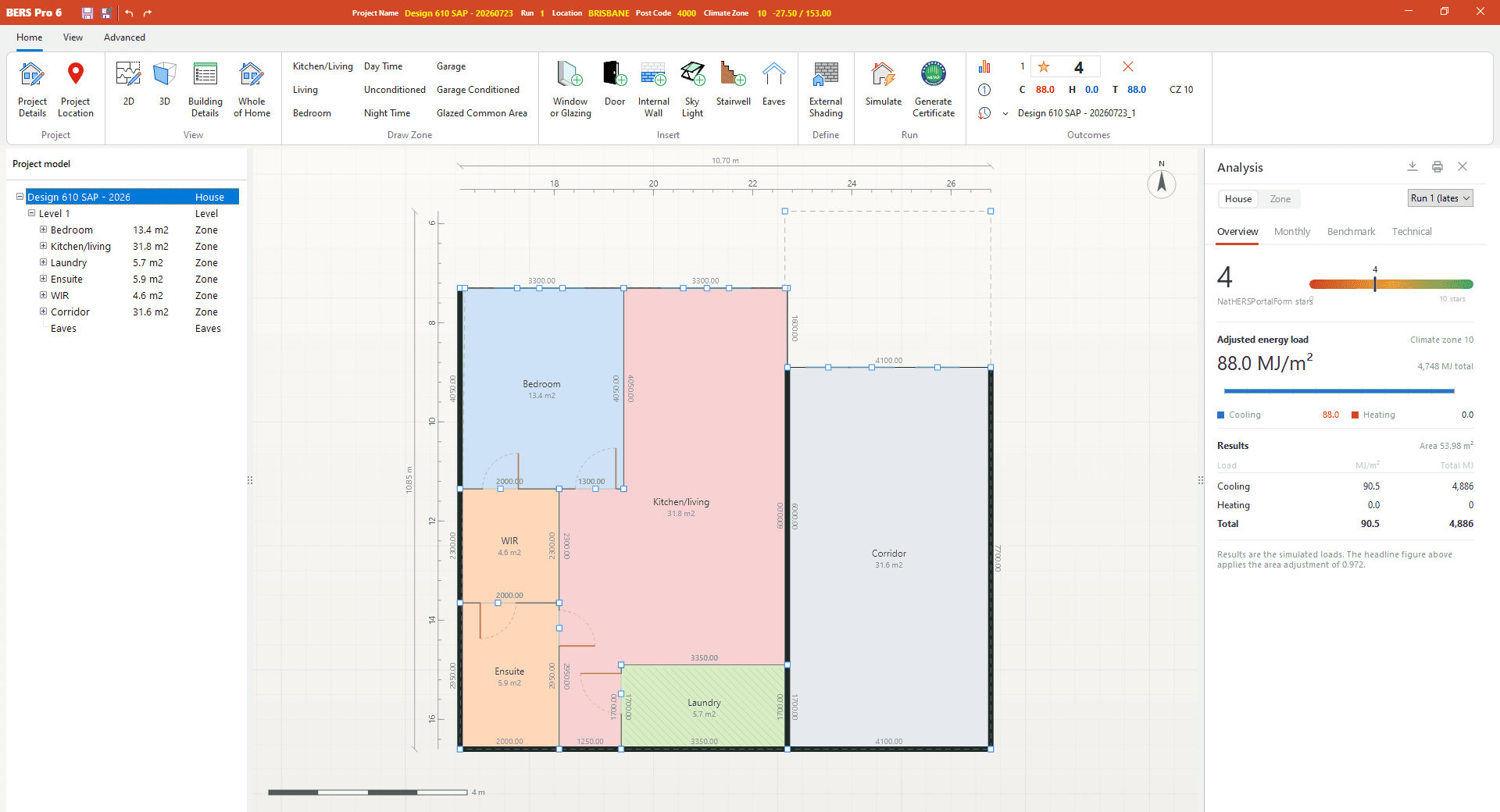
The AccuRate engine runs in the background while you keep working. When it finishes, the analysis panel tells the whole story.
Star rating and loads, instantly
Simulate with F5 and read the NatHERS star rating, adjusted energy load and heating and cooling MJ/m² straight from the ribbon.
Monthly, benchmark and technical views
Drill into month-by-month loads, compare against NCC load limits and inspect the technical metadata behind the result.
Compare runs, batch climates
Keep prior outcomes alongside the current run, and batch-simulate across climate zones or Whole of Home profiles in one go.
Whole of Home
Rate the whole home, not just the shell
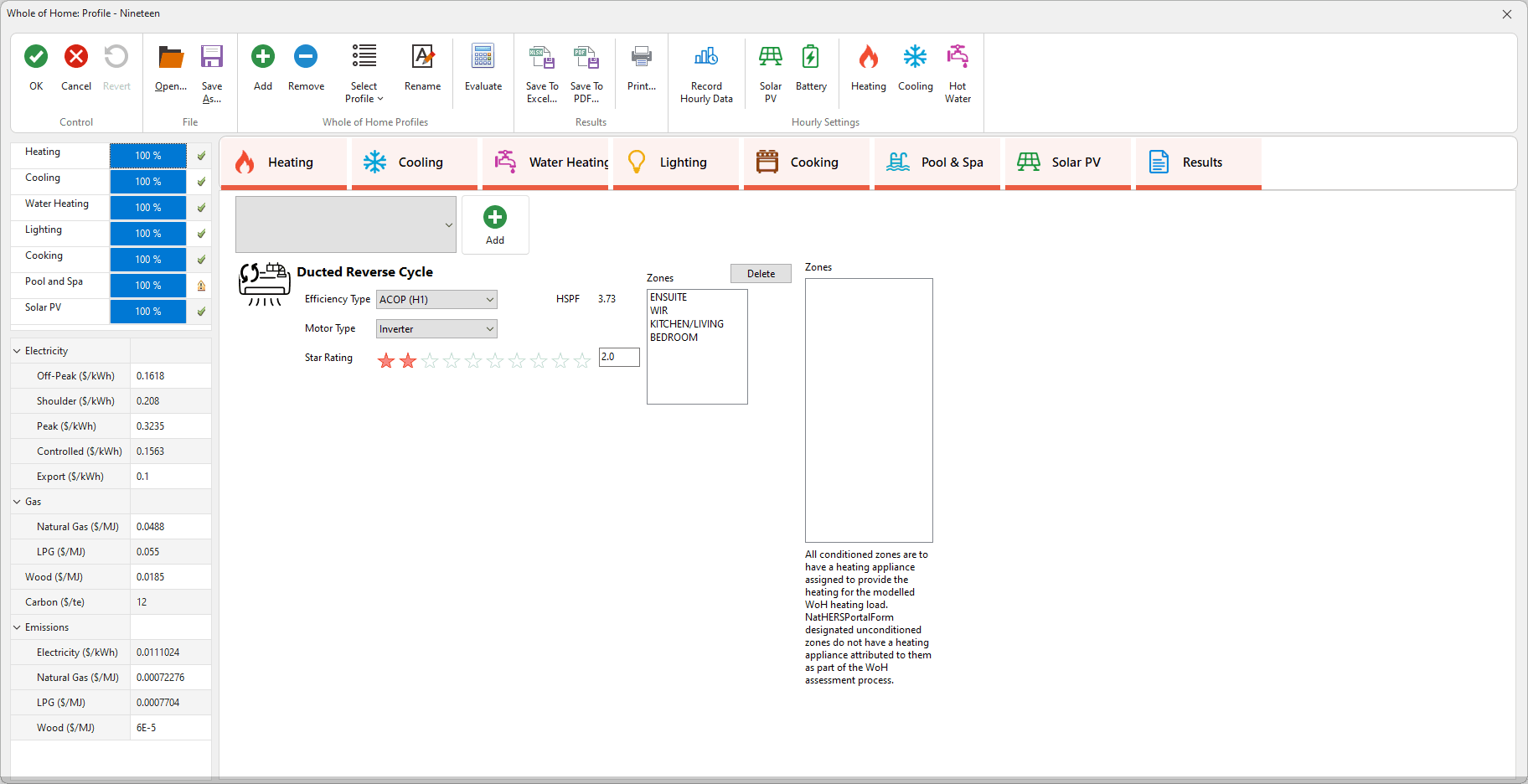
NCC 2025 asks for more than a thermal rating. BERS Pro 6 brings appliances, hot water, lighting, pools, PV and batteries into the same assessment.
Every fixed appliance, one profile
Heating, cooling, water heating, lighting, cooking and pool & spa systems, each assigned to the zones they serve.
Solar PV and battery
Add rooftop PV and battery storage and see their effect on the Whole of Home rating and energy categories.
Hourly results, exported
Evaluate against All Day and Work Day profiles, record hourly data and export results to Excel or PDF for the client.
Certificates & portal
From simulation to certificate in minutes
Everything the HERS Portal needs is generated from the model you have already built.
Generate the portal package in one step
BERS Pro assembles the certificate XML, project file, engine input and plan images into a single, ready-to-submit package for thermal-only or Whole of Home certificates.
Upload without leaving the app
The HERS Portal is embedded in BERS Pro, so you can submit and track certificates right after simulating.
Certificate credits at a glance
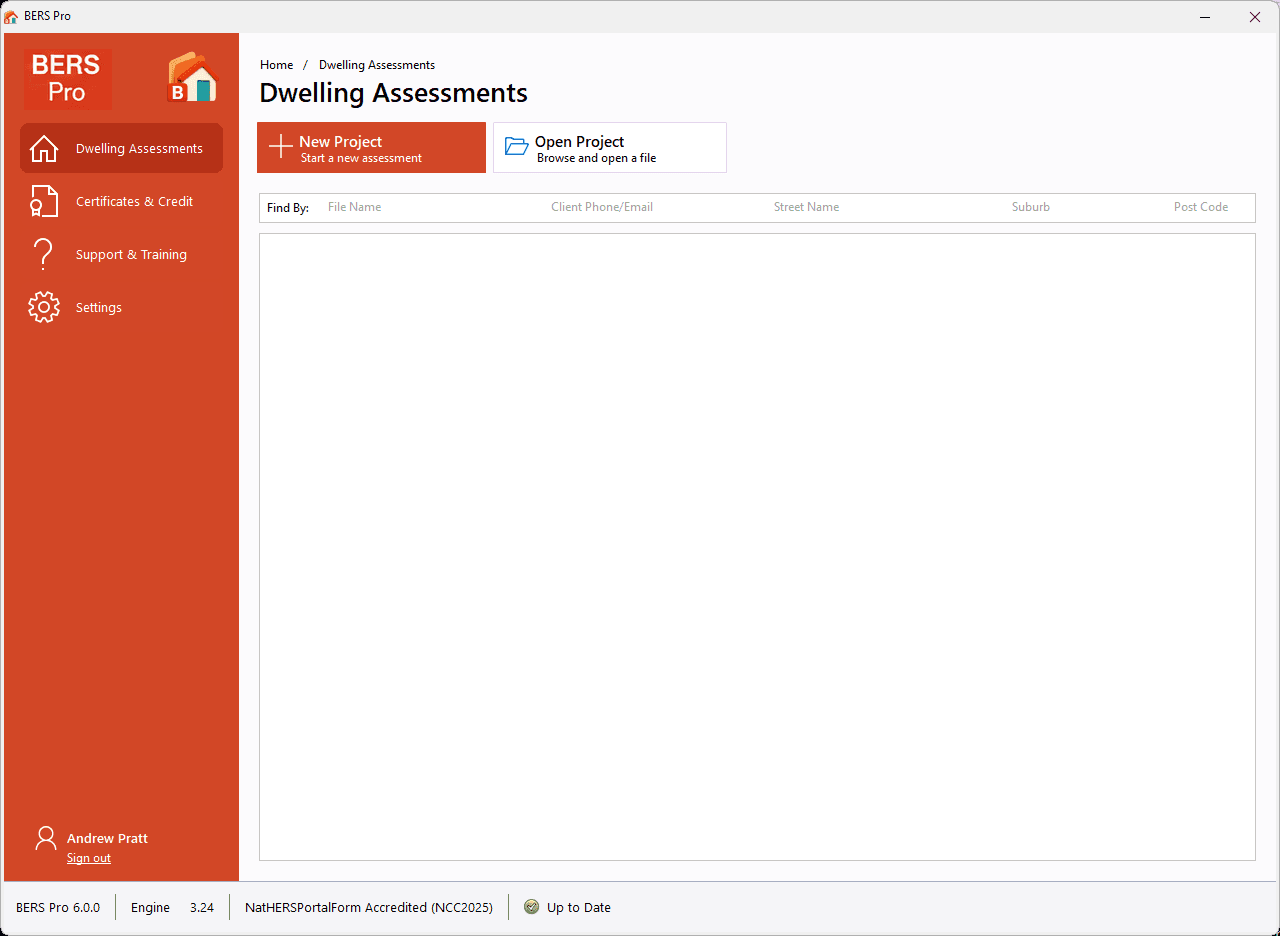
See available credits from the launcher, top up when you need to and keep every certificate tied to your Energy Inspection account.
Start from what you have
Open the files you already work with
No re-drawing from scratch. Import projects from other NatHERS tools, open legacy BERS Pro files, or trace directly over the architect's plans.
- .fr5
FirstRate 5
Bring FirstRate 5 projects straight in and keep working in BERS Pro.
- .hero
Hero
Open Hero files as a starting point for your BERS Pro assessment.
- .ber
BERS Pro 5
Legacy BERS Pro projects open as they are, ready for re-simulation.
- .pdf
Architectural plans
Load a PDF or image floor plan, calibrate the scale and trace zones on top.
BERS Pro 6 saves to the open .berx JSON format, so your project data stays readable and portable.

Built for compliance
Accredited, current and ready for the code you rate against
NatHERS Accredited for NCC 2025, running the AccuRate (Chenath) engine version 3.24. The details that trip up an assessment are handled in the tool, not in a spreadsheet.
NCC 2025 provisions
Heating and cooling load limits, load-limit concessions for outdoor living areas and ceiling fans, and jurisdiction-specific settings built in.
Classes 1A, 1B, 2 and 4
Rate detached and attached houses, apartments and mixed-use dwellings. Multi-dwelling workflows keep large jobs organised.
New, pre- and post-renovation
Simulation modes for new homes and for additions, alterations and extensions, with existing and proposed runs side by side.
Thermal bridging & steel frames
Model steel-framed walls with thermal breaks and apply thermal bridging where the jurisdiction requires it.
Suspended & slab floors
Explicit modelling of suspended floors, sub-floor ventilation, slab edge insulation and waffle pods.
Automatic updates
Engine, climate data and compliance changes are delivered automatically so every certificate is issued from a current release.
About NatHERS
The scheme behind every star rating
The Nationwide House Energy Rating Scheme (NatHERS) is an Australian Government program for measuring, and improving, how energy efficient our homes are.
Rather than testing a finished building, NatHERS uses accredited software to simulate a home’s passive performance: how much heating and cooling energy it will need over a typical year, given its design, materials, orientation and climate. That result is expressed as a rating from 0 to 10 stars.
The star rating, together with the underlying heating and cooling loads, goes onto a NatHERS Certificate, which is how designers, builders and certifiers demonstrate that a new home or renovation meets the energy efficiency requirements of the National Construction Code and their state or territory.
BERS Pro 6 is NatHERS accredited software, built and tested to the requirements of the NatHERS Software Accreditation Protocol for NCC 2025.
“Explaining NatHERS” — Department of Industry, Science and Resources, Australian Government.
Useful NatHERS resources
- NatHERS websiteScheme overview, news and how ratings are used.
- NatHERS accredited softwareThe list of tools accredited to produce ratings.
- Software protocol – key requirementsWhat accredited software must do to stay accredited.
- NatHERS CertificateWhat the certificate contains and how to read it.
- Assessor HandbookModelling rules every assessment must follow.
- Technical NotesDetailed guidance on specific modelling situations.
- Heating and cooling load limitsABCB guidance on the NCC load-limit requirements.
- National Construction CodeThe code your rating demonstrates compliance with.
- NatHERS newslettersStay across scheme updates and deadlines.
The Chenath engine
CSIRO science under the hood
BERS Pro 6 models the home; CSIRO’s Chenath engine does the physics.
Every NatHERS accredited tool, BERS Pro 6 included, is licensed to use the same calculation engine: Chenath, developed and maintained by CSIRO. It is the engine inside AccuRate, and it is what turns a building description into hour-by-hour heating and cooling loads for the year.
When you press Simulate, BERS Pro 6 writes your zones, constructions, openings, shading and site data into the engine’s input format, runs AccuRate (Chenath) 3.24, then reads the results back and presents them as star ratings, loads, monthly charts and benchmark comparisons. Because the engine is common to all accredited tools, the same home modelled correctly in BERS Pro 6 rates the same anywhere.
Engine updates are shipped with BERS Pro 6 automatically, so you are always simulating with the version accreditation requires.
Support & training
Real people, real answers
Support is built into the application and one click away on the web. Sign in from the launcher to see your certificates, credits and support resources in one place.
Help & Support centre
Getting-started guides and the BERS Pro FAQ, searchable and kept current with each release.
Browse the help centreRaise a ticket
Stuck on a model or a portal submission? Log a ticket and the support team will get back to you.
Create a ticketEmail us
Licensing, account and general enquiries are answered within one business day.
admin@energyinspection.com.auBuilding or renovating?
Find an Assessor to rate your home
BERS Pro 6 is the tool assessors use; the rating itself is carried out by a NatHERS accredited assessor. Tell us where the home is and we will point you to assessors nearby.
Accredited assessors only
NatHERS ratings can only be issued by assessors accredited through ABSA, Design Matters National or HERA.
Search by location
Enter a suburb, postcode or state to see assessors near the home, sorted by distance, alongside Google Maps results.
A certificate your certifier accepts
Your assessor models the home in BERS Pro 6 and issues an official NatHERS Certificate for the building approval.
Start a career in energy rating
Want to become an Assessor?
Accredited assessors give homeowners and builders trusted ratings that show a design meets the National Construction Code. Here is the path to becoming a NatHERS assessor for new homes, the ratings BERS Pro 6 is built for.
Already an assessor accredited in another tool? Adding BERS Pro 6 means completing software training with a NatHERS endorsed trainer and sending the certificate to your accrediting organisation. The official page lists the endorsed BERS Pro trainers.
- 1
Complete the Certificate IV
Finish the Certificate IV in Home Energy Efficiency and Sustainability (CPP41126) with a registered training organisation. You train in the NatHERS software you plan to use, so ask your provider for BERS Pro.
- 2
Apply to an accrediting organisation
Accreditation is issued by an Assessor Accrediting Organisation: Australian Building Sustainability Accreditation (ABSA), Design Matters National or the House Energy Raters Association (HERA). Each sets its own application steps.
- 3
Keep your accreditation current
Each year, earn at least 12 CPD points, lodge at least three NatHERS assessments in the tools you are accredited for, and hold professional indemnity and public liability insurance.
- Accrediting organisations:ABSADesign Matters NationalHERA
Summarised from the Australian Government’s Become an Assessor page. Requirements change; always check the official page and your state or territory regulator.

For accredited assessors
Ready for your next assessment?
Download BERS Pro 6 for Windows, sign in with your Energy Inspection account and start rating homes in minutes.
Not an assessor? Find an Assessor to rate your home